Posts

Photohsop Printing background grey instead of white
Image
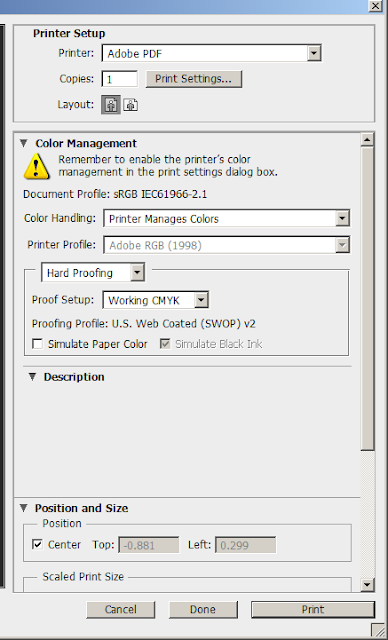
ഫോട്ടോഷോപ്പ് ഉപയോഗിക്കുന്നവർക്ക് ഉണ്ടാകുന്ന ഒരു പ്രേശ്നമാണ്  ഫോട്ടോഷോപ്പ് ബാക്ഗ്രൗണ്ട് white ആണെങ്കിലും പ്രിന്റ് ചെയ്യുന്ന സമയത് ചിലപ്പോൾ grey കളർ പ്രിന്റ് ആവുക. അത് എങ്ങനെ ഫിക്സ് ചെയ്യാം എന്ന് നമുക്ക് നോക്കാം  1 - ഫോട്ടോഷോപ്പ് ഫയൽ പ്രിന്റ് preview യിൽ hard പ്രിൻറർ പ്രൊഫൈൽ "Hard Proofing " ആണെങ്കിൽ   simulate paper color എന്നത് uncheck  ചെയ്യുക . അവിടെ checked ആണെങ്കിൽ നിങ്ങളുടെ പേജ് background വൈറ്റ് ആണെങ്കിലും പ്രിന്റിൽ grey  കളർ ആണ് വരിക . 2 -   പ്രിന്റ് preview  യിൽ printer profile നോർമൽ ആക്കുക 

How to export contacts from Icloud

Image
How to export contacts from Icloud 1 -  Open Icloud in you PC and sign in . (May be you need verify your account if you activate Two factor Authentication)  2 - In the left bottom corner you can see setting icon . click on it and select export vCard. 3- your contact will be downloaded soon  . you can copy it to SD card and also can restore to your sim card. Thanks  Team Let us share....

How to export contacts from Gmail

Image
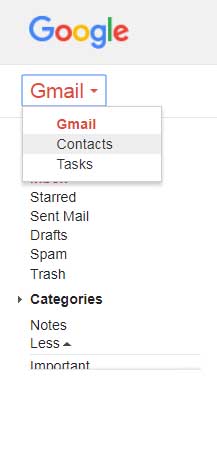
How to export contacts from Gmail 1 - Open Gmail and sign in. 2 - From left side of the window  select Contacts. 3- In contacts go to More and click on export. Just click to Go to old version. 4- Go to More and click on Export . 5- select which contacts you want to download and which format. (if you want import to mobile device vCard file needed) then click on Export . Your contracts will be downloaded in few seconds and you can copy it to SD card and also can restore to your sim card. Thanks  Team Let us share....
Image
HOW TO IMPORT CONTACTS TO NOKIA BASIC PHONE LIKE NOKIA 150 While we are using NOKIA basic phone like NOKIA 150 we may face problem that  there no option for import contacts. How to copy contacts? We need four things : 1- Nokia 150 with SD card 2- VCF file  3- USB cable 4- Computer Steps: 1- Backup your contacts from your device (Iphone, Android, nokia, also from gmail, icloud) to VCF file ( contacts.vcf ). 2- Change the file name and extension ( contacts.vcf ) to ( backup.dat ). 3- Connect your Nokia to a computer with a USB, you will get two choices on the Nokia screen (Charging only and Mass storage), choose Mass Storage ,  don't press  done . 4- You will get a new  Removable Disk in my computer , then copy the renamed file( backup.dat ) to your SD card. 5- Back to your phone ,  press Done and disconnect the USB. 6- On the Nokia go to  Menu –> Settings –> Backup –> Restore backup,    you...

How to unlock PDF

Image
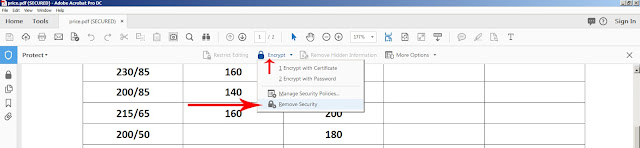
How to remove the security of you document? How to unlock pdf Open the file and go to encrypt and click remove security and type the password now your file is ready to open ,edit and print without password. If you don't know the password you can find third parties in internet. please watch the video .

How to lock pdf file to print and open (Encrypt with Password) and How to unlock

Image
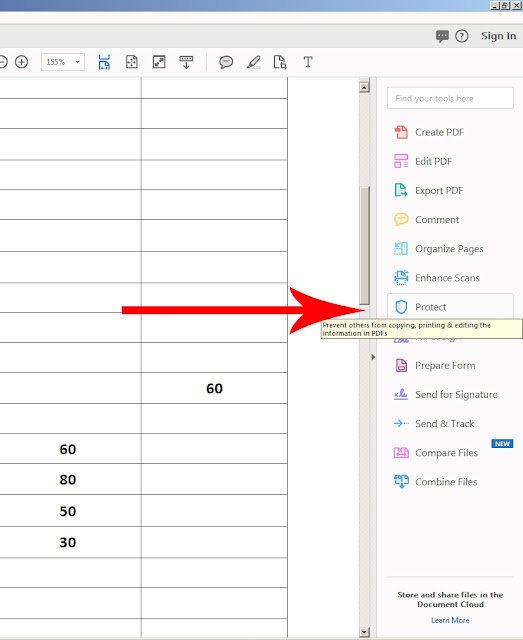
How to lock PDF file to open and print  (Encrypt with password) Sometimes we need protect our file with password to open or print. We can protect our pdf in a easy way 1. open you pdf in Acrobate  and go to PROTECT You can find "PROTECT" in right side of pdf or you can find in "TOOLS" option . 2. Go to ENCRYPT - ENCRYPT WITH PASSWORD   3. if you want protect only from open just click "REQUIRE A PASSWORD TO OPEN THE DOCUMENT" and type the password . OK When you click ok , needs to retype the password for confirm . so just retype the password .then OK next you will receive another message that "security setting will apply the document only after save. so please save the document.  Now your file needs password to open . 4.If you want restrict editing and printing of the document just click "Restrict editing and printing of the document" Printing allowed : None Change Allowed : None and type pa...

HOW TO PRINT ON LETTER HEAD PAPER

Image
Sometimes we needs to print on Letter head papers. May be we don't have much enough papers, so we can try to print it directly from your file. How ?? 1. Just scan you letter head paper to computer as JPEG. 2. Open your document in word and go to "WATERMARK" in "PAGE LAYOUT" menu and select "CUSTOM WATERMARK". 3. you will get a new window  >  click on "PICTURE WATERMARK" > select the scanned picture of you letter head > Scale to 100 % >  check / uncheck  "washout" > Apply and OK 4. you can adjust it with mouse or using arrow key after finish the adjust just close header and footer or just double click in center. check the video Thanks...... Team Let us share

How to activate staple option in RISO COMCOLOR 7150 ShareEmbedEmail

Image
How to activate staple option in  RISO COMCOLOR 7150  I am using RISO COMCOLOR 7150 . when i am trying to print there is no staple option in printer setting. How to Fix? > open printer properties (start menu- device and printers - you can find you printer) > Go to "SECURITY" tab there allow all the permissions  > go to next tab "environment"    then click on "Get printer info" If you insert the staple in printer there you can see offset stapler as "installed" then apply and ok now you can get staple option in printer setting check my video  Thanks  Team Let us share

HOW TO ADD ADDRESS BOOK TO YOUR PRINTER

Image
HOW TO ADD ADDRESS BOOK TO YOUR PRINTER ? There is two steps we need First - share folder Two - share with printer Share folder To add address book in you printer we need to create a folder . Then go to folder properties - second menu - "SHARING" in sharing select "SHARE" in "SHARE" select "EVERYONE" then "ADD" in permission level select "READ/WRITE" then "SHARE" - "DONE" then click  "ADVANCE SHARING" in advance sharing mark "SHARE THIS FOLDER" then select "PERMISSION" select "FULL CONTROL " then "APPLY- OK" Now our folder is shared Next we want to share it with printer we want to find the IP address of our printer How to find IP of our printer ? go to device and printer , then select your printer - in"option " open" printer properties" go to second menu "PORT" in port you can find the I...

How to Print multiple pages in one paper - MS Publisher

Image
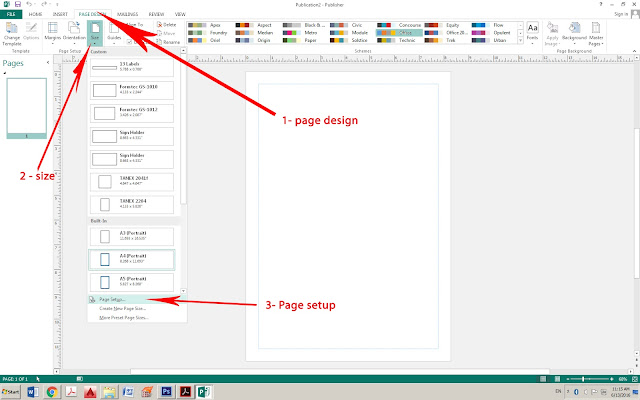
MS Publisher is a very useful Application. when we are using the Photoshop or CorelDraw or another editing software , if we need multiple copies or labels we needs to copy past and arrange one by one.  But if we are using the MS Publisher we want make only one and we can make it multiple one time. cool.   we can see, i want a photo in 5/5 cm size in one page full. open the publisher - Go to Page Design - Size - Page setup In page setup Put the width and height select multiple from layout type Target paper size make A4 ok Then insert the Picture , and print Select printer Multiple copies per sheet Click layout option and arrange the margin then print Cool right ? Just like this if you want business cards or other labels you can use it very easily   and there is also lot of featured and built in templates. Thank for watching  Team - Let us share

Print two side business card

Image
How to print two side business card? When we are trying to print two sided cards , sometimes we face too much problems. maybe print not come the same portion and same size. Here i will show you how to print two sided business card  . 1. Design the card in Photoshop.     (business card size 9/5) 2. Arrange  first page and second page separate in new A4 size. 3. Crop the page and save as pdf. 4. Open acrobat and combine the two files  5. Open the file and Print ite in actual size and two side     (Finishing - Two side ) Now your business card is ready.  sharp and smooth size . Print and cut Thanks for watching Let us share......