Posts

Showing posts with the label copy contacts to sim card

How to export contacts from Icloud

Image
How to export contacts from Icloud 1 -  Open Icloud in you PC and sign in . (May be you need verify your account if you activate Two factor Authentication)  2 - In the left bottom corner you can see setting icon . click on it and select export vCard. 3- your contact will be downloaded soon  . you can copy it to SD card and also can restore to your sim card. Thanks  Team Let us share....
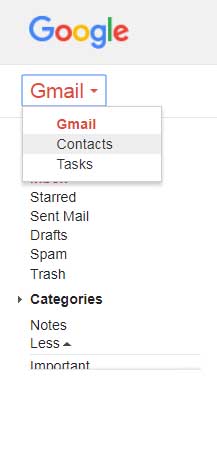
How to export contacts from Gmail

Image
How to export contacts from Gmail 1 - Open Gmail and sign in. 2 - From left side of the window  select Contacts. 3- In contacts go to More and click on export. Just click to Go to old version. 4- Go to More and click on Export . 5- select which contacts you want to download and which format. (if you want import to mobile device vCard file needed) then click on Export . Your contracts will be downloaded in few seconds and you can copy it to SD card and also can restore to your sim card. Thanks  Team Let us share....